

Role Based Security
Security Roles and Permissions
- A security role allows a person to see or do things within Workday.
- Security roles are generally assigned to positions, and allow employees to complete the work required by their position.
- Roles will be used to determine what Workday training employees are expected to complete.
All workers will have some self-service access in Workday.
What is Role-Based Security?
- Role-Based Security is a collection of permissions operating within a business process which govern what actions you can take in that process.
- Role-Based Security determines what data you can view, including reports
- Workday clusters related business processes together, but we decide which roles will get access to which group of items!
Benefits of Role-Based Security
- Currently security is on a person; in Workday it’s on a position.
- Security roles are assigned based on what a position does.
- The number of roles a person has will vary by department.
- The roles on a position can change if needed.
- Expect tighter control of data to protect the University.
- Functional first: departments are driving which positions get which roles.
Role-Based Security Is NOT:
- A direct match between a role and your job title
- One role with a comprehensive set of all your job duties
- Meant to tell departments how to divide up work
- Unchangeable
If you find that your role based access does not meet the requirements of your duties, you can request a review of your access through Workday.
- Login to Workday
- In the Search Bar type "Create Request"
- Select the "Create Request" task
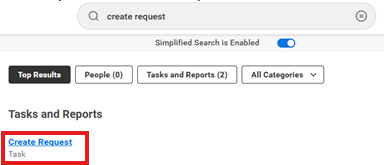
4. To identify the correct Request Type, Type "Security". A drop down of the requests associated with Security will appear.
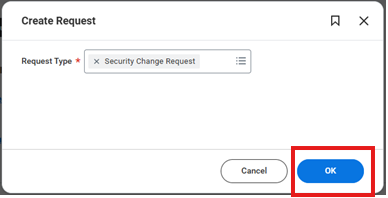
5. Fill out the form and "Submit"
This request will route automatically to the appropriate approvers.
** If you are unable to identify the particular security request type t.hat needs to be added or deleted from your account, please enter a Workday Support ticket describing your request so that the appropriate security request type can be identified.
To check the status of the request, after submission: go to "My Tasks" and select "Archive", then search for the Security Request.